MMA training / March 30–April 3, 2026
Learn by doing.
Decoding AI for Marketers VII: The Autonomous Marketing Era
Hands-on exercises led by Caleb Briggs and Rex Briggs.
Materials from the 2026 training round, retained for independent study. Instructions, interfaces and prices reflect that course; external tools may have changed. Surveys open on their own sites.
MMA session recordings (member access) ↗ · AI training assistant ↗
The downloadable n8n example has personal credential references removed. Connect your own accounts and select your own Google Sheet before running it.
Prerequisites
Login. If you have a paid account already, great. If not, create a free account. If your access is blocked by your employer, consider using a personal computer/personal email. We will demonstrate what you are missing live.
- Adobe's Firefly (free)
- Meta's Meta.ai (free)
- Google's Gemini (free)
- Open AI's ChatGPT (free)
- Grok (free)
- Anthrhropic's Claude (free)
- Google's NotebookLM (free)
- N8N No Code Agent Builder n8n.io (free tier)
- Groq API (free)
- Google's Gemini (free)
- Open AI's ChatGPT (paid) or JaredGPT.
- OpenAI API (Requires credit card and can be funded with $5)
- N8N No Code Agent Builder n8n.io (free tier)
- Google's Pomelli (free)
- N8N No Code Agent Builder n8n.io (free tier)
- Google's suite:Flow, Whisk and AI Studio (video) (free)
- Runway (free tier)
- Vibe Coding Platform Lovable (Free tier)
- ChatGPT, Gemini and Claude- see above.
- Optional: Claude Cowork and Claude Code (requires download and access/control of your computer -- consider the risk before doing this optional exercise).
Monday
Tuesday
Wednesday
Thursday
Friday
Course draws from The AI Conundrum (MIT Press), which you can order here. Reading part 1 is strongly encouraged, but it is not a prerequisite. You can find a free PDF pre-print version of Part 1 if you prefer not to order the book.
An audio version is available from Audible.
Study Guide and Content Summaries are exercise 4 on Day 1. Below are AI generated ~20min podcast summaries for each day (using NotebookLM). These sessions are from March 30 to April 3 2026 sessions.
- Day 1 - 20min Podcast
- Notice that the AI gets the vibes and the vast majority of details correct from the training content, but hallucinates the counts for the line intersection experiment. It is directionally right, but factually wrong -- ironically (or appropriately) emphasizing the overall point from The AI Conundrum.
- Day 2 - 20min Podcast. The first version of the output was too negative, so we set a new prompt to steer the AI to the output that was more balanced. Listen to the original version when you have time, for a comparison. Consider the role of the prompt in steering (biasing) the output.
- Day 3 - 20min Podcast
- Day 4 - 20min Podcast
- Day 5 is a live analytics exercise and discussion. A podcast after the session concludes.
Human in the loop: We reviewed each podcast. We decided to adjust the prompt for Tuesday and re-generate because we wanted more balance in the way the podcast presents the risk and benefit. It is a good example of the importance of the Human in the Loop to QA the output.
Day 1: Hands-On Exercises
Exercise 1. Hands On Exercise: Getting To Know You
Exercise 2. Hands-On Exercise: Image Generation
Note, this exercise will be demonstrated live.
- Access Adobe Firefly
- Prompt: Your pet + favorite artist, or art style
- Download your image (top right corner of your image)
- Launch Adobe's In-painting/Out-painting Editor
- Upload your image and select "Insert" on left menu. Erase part of your image where you would place a hat. Add the prompt Top hat or other hat and click generate.
- Click "Keep" or "cancel" and move on to out-painting. Select Expand on the menu to the left.
Example: A silver lab in a painting by Vincent Van Gogh (or in an impressionist style)
Try modifiers such as "Photorealistic, 4k, high quality" or "Romanticism, Modernism, Digital Age" or "Minimalism, Surrealism, Pop art"
Example prompt: "portrait photo of an Asian old warrior chief, tribal panther make up, blue on red, side profile, looking away, serious eyes, 50mm portrait photography, hard rim lighting photography"
For out-painting - see Part 2 of the guide
Notice how the amount of overlapping versus blank canvas in out-painting gives the AI context and how that context influences what the AI returns.
Consider what is easy versus difficult for the AI to create as you provide prompts.
Interested in exploring more? Try Meta, Gemini, Grok, or ChatGPT image generation - there are a lot of options for image generation.
Exercise 3. Hands-On Exercise: Exploring Bias and Mitigation Approaches
- Access Meta
- Prompt: /image meta ad sales exec.
Extra Time? Try Gemini and try Grok
Note: Image prompts are transformed into more robust prompts by most services. Meta used to provide the internal prompt used in the HTML, but has blocked the ability to see the prompt at some point after the January 2025 training session.
Exercise 4. Hands-On Exercise: Large Language Models (LLMs) for Summarization and Inference.
Strengths: Summarization with Question & Answer
- Click on this link to download the speaker notes.
- Login to Google's NotebookLM (free). Click "Try NotebookLM.
- Click "+Create new" to start a notebook.
- Select +Add source and add mma_ai_training_long_context.pdf from your download file.
- In the "Studio" panel on the right, in the Audio section, click symbol to the right to add instructions and generate Podcast."
- Access your podcast (or one above). As you get into the wrap-up (at about 16min) try "Interactive mode (beta)" and ask questions, as if this is a call in show.
- In your NotebookLM, test the summary capabilities: Ask, "Concisely Summarize Why AI Matters to Marketers. Use only 250 words." Next, use the MindMap and Flashcard options.
Exercise 5. Hands-On Exercise: AI Knowledge Assessment
- Take 12 question Self-Assessment of AI knowledge.
Write down your score. We revisit this on Tuesday.
The goal of Part 1 of The AI Conundrum book is to level-up your score. If you have time, give it a read.
NPS Survey on Day 1 of Training: Because we value your feedback AND because we will use this data to show an example of how to do analysis with AI (on Friday).
Day 2: Hands-On Exercises
Exercise 6. Hands-On Exercise: Build a Simple Robotic Automation in n8n
Note, this exercise will be demonstrated live. We will start with a deterministic workflow, then add an AI agent so you can see the difference between robotic automation and an agentic workflow.
- Create a free account at n8n and click Start from scratch. Follow the steps in the walk-through with screenshots.
- Get your API key from Groq (free)
Now make it agentic:
Walkthrough details are in the same document with screenshots., below the robotic automation.
For the System Message to the LLM, consider "You are a helpful assistant proving tips on a user's desire to learn something about a specific topic related to AI. Provide three sentence or less tips, based on this desire to learn about:" (DRAG in “What do you want to learn” block into the system message so it is reasoning about the content.)
For the Groq model, select groq/compound. To learn more about agentic workflows and agents, read Anthropic's Paper.
Exercise 7. Hands-On Exercise: Build a Custom GPT Specialist Agent
For this exercise, we build a narrowly scoped specialist agent that makes creative recommendations.
- Open ChatGPT. If you do not have a paid ChatGPT account, use the fallback Custom GPT Builder JaredGPT. (Thanks to Jared Briggs for whipping up a clone of ChatGPT for building customer GPTs without a paid ChatGPT subscription -- this will be available for the week of training only.).
- Use the walkthrough or follow the steps, staring with Click Explore GPTs on the left rail.
- Click Create in the top right, then choose Configure (Fallback defaults to Configure).
- Give your GPT a name. For example: Creative Version Recommender.
- Give it a description. For example: Helps with creative version ideas and story boards.
- Copy the instructions/prompt into the instructions box:
- Conversation starters are optional. They are useful if you are giving the GPT to get the conversation started. It is not needed in this use case.
- Download the three knowledge files and upload them into the GPT: Google Creative Best Practices Guide (2024), Creative Best Practices, Creative Notes.
- In Capabilities, turn on:
- Web Search
- Image Generation
- Code Interpreter
- Click Create and test the GPT.
- Enter product name, such as Major League Baseball ticket sales
Example test input: Major League Baseball ticket sales
Test an advertisement: If you don't have one, you can use the MLB example and MLB Ad.

Exercise 8. Hands-On Exercise: Deep Research Agents
This exercise works well in Gemini or ChatGPT. There are many others that offer Deep Research as well. The goal is to experience an off-the-shelf research agent and then evaluate how well it performed.
- Open Gemini or ChatGPT.
- Use the Deep Research tool, or explicitly prompt the model to perform deep research.
- Choose one of two options:
- Create your own prompt on a topic you know well, so you can judge the output.
- Use the prompt to ask your favorite LLM to help you write the deep research prompt: "What is a good deep research prompt to analyze my company, mmaGlobal.com? (Replace with your company name.)
- Kick off the research and let it run.
- While it is running, so that you see what the agent is doing, inspect the plan, reasoning, tool use, and iterations (if your interface shows them).
- After the session, read the full report and decide how well the agent performed compared with what you could have produced in one day. Give it a letter grade (A, B, C, D, F) based on how it did.
Suggested uses: competitive analysis, market research, and meta analysis summary. For personal use, consider analysis of health research, history, how things work, travel and more.
Evaluate Deep Research
- Read your Deep Research output before our next session.
- Grade it using the scale below based on how it compares to what you could have done in one day:
- A = as good or better
- B = about on par
- C = useful but with factual or conceptual issues
- D = poor
- F = outright failed in producing value
- Come prepared to share your grade in the next session.
Extra credit: After you run the Deep Research on your company, follow up in the chat prompt. Use your company name, your role, and a short description of what you do. Then, ask it to help you brainstorm how a vector database could save time and improve internal knowledge sharing. Deep Research isn't just a report. It is context you've primed your LLM with so that you can now have deeper conversations grounded in the Deep Research knowledge as context.
Take Home Exercise 9. Hands-On Exercise: Scheduled Tasks / Notification Agents
This exercise shows the shift from reactive chat to proactive agents that wake up on a schedule and notify you with their analysis.
- Open your preferred assistant:
- Enter the prompt below and set the scheduled task.
Prompt: “Every Tuesday at 9 AM, scan for new case studies or white papers published in the last 7 days regarding AI Optimization (AIO) or GEO (Generative Engine Optimization). Specifically, find one example of a brand that increased its ‘share of model’ (visibility in AI answers) and summarize the specific tactic they used. Notify me with a 3-bullet summary.”
- Save the task and verify the assistant confirms the schedule.
- Notice the four major parts of this workflow: intent extraction, background execution, verification/gatekeeping, and proactive delivery.
NPS Survey on Day 2 of Training: Because we value your feedback AND because we will use this data later as part of an analysis exercise, please fill in your feedback from today's session.
Day 3: Hands-On Exercises
Exercise 10. Hands-On Exercise: Build a GenAI Audio Ad Workflow in n8n.
We will build the workflow step-by-step in n8n so you can see how a chat trigger, an AI agent, and a voice generation node work together.
- Open n8n. If you did not create an account earlier in the week, do that now.
- Click Create workflow, and follow the steps in the first step.
- Search for Chat Trigger and add it as the walkthrough. Note that there are two Parts. We will cover Part 2 on tomorrow, but feel free to go as far as you would like.
- If needed, create an API key at platform.openai.com, then paste it into n8n and confirm the credential turns green. In the AI Agent, add a model. The live demo uses OpenAI GPT-5 mini as a low-cost starting point.
- Test the workflow with a short prompt for your brand.
Create a 10 second script for an advertisement for [your brand or product].Prompt: Example: Create a 10 second script for an advertisement for Marketing & Media Alliance AI Training.
- Notice how the output includes scene directions or extra text? The agent needs instructions to just provide the voice over. Action: Trash the line between AI agent and Generate audio and insert a second AI Agent.
- Set the second agent should use the first agent’s output as the prompt. Add a System Message such as: Your role is to extract the voiceover script from the prompt. Output only the voiceover script. Nothing more.
- Add a model to the second agent, test it, then reconnect it to Generate audio.
- Copy the output into a Google Sheet so you can compare runs before and after changes.
Extra Credit: You can also try Gemini or another supported model if you already have credentials and want to compare outputs. Try other voices in the Generate Audio Output.
Exercise 11. Hands-On Exercise: Create a Brand DNA System Prompt
Now we teach the agent your brand guidelines so the ad output becomes more consistent and more on-brand.
- Open your preferred LLM:
- If you have a brand guideline PDF, upload it and ask the model to summarize it into a concise markdown system prompt.
- If you do not have a guideline handy, give the model your website URL and ask it to infer your brand DNA.
- Keep the result concise enough to paste into a system prompt field. Aim for fewer than 7,500 characters.
- Copy the output into the System Message field of the first AI Agent in n8n. I used the following text before the brand guidelines: "You are an Audio Voice Over advertisement creator for a brand whose voice is:" (and then copied the brand guideline to follow).
- Save the brand-guideline summary in a Word or Google doc. You will use it in the evaluation exercise.
Prompt: Summarize the brand DNA from [your website URL] and write a concise system message I can give to an LLM before it generates any advertising messages for my brand.
Example: Summarize the brand DNA from www.mmaglobal.com and write a concise system message I can give to an LLM before it generates any advertising messages for my brand.
Optional: If you want to experiment further, check out Pomelli. Log-in. Click on Business DNA and enter your URL.
NPS Survey on Day 3 of Training: Because we value your feedback AND because we will use this data later as part of an analysis exercise, please provide your score and feedback from today's session.
Day 4: Hands-On Exercises
Exercise 12. Hands-On Exercise: Evaluate the Output Against Brand Guidelines
This is your first taste of agentic evaluation. We will compare multiple outputs against the same brand guideline and see whether the models converge on a similar judgment.
- Run your audio workflow multiple times and save the outputs into a Google Sheet like this example. Generate at least one example before the System Message with brand guidelines and one after.
- Open ChatGPT, Claude, or Gemini.
- Tip: You can return to the LLM you had generate the brand guideline and continue the conversation with the prompt: Grade the output in relation to the attached brand guidelines and the goal of a 10-second-or-less audio advertising script. Explain the strengths, weaknesses, and specific revisions needed.... and use angle brackets for ad1, ad2, etc.
Copy the brand guidelines and the ad evaluation prompt and try a the other LLMs and see if they agree on the rank order of your ads. You can use this prompt for MMA as a reference. Be sure to swap in your brand guidelines.
Exercise 13. Hands-On Exercise: Build Evaluation Agentic Workflow
We take the manual evaluation from your LLM and build it into your n8n workflow.
- Duplicate the workflow and rename it Audio Agent with Evaluation.
- Give the chat a prompt, like create 10 second ad. Tip: If it won't take your chat message (which happened to us during testing), click "Personal" in top left corner to go back to your list of projects and then click on the workflow. Sometimes with duplicating the workflow, n8n need a quick reset.
- In the new workflow, Use the walkthrough, starting on page 9, to compete the evaluation agent and Google sheet recording of output.
- Trash the connection from the last AI agent to the Generate Audio node
- Evaluation Agent: Add AI Agent and use the same OpenAI Model.
- Source of Prompt: Select "Define below" and drag the output from previous agent -- that is the voiceover output.
- Click "Add Option" to include a System Message. The System Message is the same you used in the LLM. Again, here is the prompt for MMA which becomes our Evaluation System Message.
- Grade Extraction: You need a way of taking the Evaluation AI Agent and extracting the grade. We will use a Code Node, and have AI help us write the code. See walkthrough.
- Use the AI to help you write the the code to extract the grade. Try writing th prompt yourself, or use something like this: I need to extract the Grade. It should be at the beginning of the output. I need only the letter grade, as in A, B, C, D, or F, nothing else.
- Run the node and test it.
- Add a Google Sheet "append row" node connected to your Code Node. You can map anything upstream in your agent to the Google Sheet. You will have to authenticate to your Google account.
- Map your prompt, the Voiceover output and evaluation grade to the Google sheet.
- Test with a prompt such as: Create a 10-second ad for [your brand]. It works if your Google sheet has the new prompt, voiceover and evaluation grade.
Tip: Rename your nodes clearly as you go. It becomes much easier to manage once the workflow starts looking like a multi-agent network.
Exercise 14. Hands-On Exercise: Add an Evaluation Feedback Loop to Your Audio Agent.
Today we move from a bounded workflow to a stronger agent by inserting an evaluator and a retry loop. The goal is for your creation agent to keep trying until it earns an A.
- Open n8n and return to the audio workflow you built on Day 3.
- Duplicate the workflow and rename it Audio Agent with Feedback loop. Click on "Personal" in the top left to return to menu. Then click on your agent. This resets n8n. If you need yesterday's workflow, you can download this JSON File and upload it into your n8n.
- Use the walkthrough, starting on page 13, to compete the feedback loop.
- Test with a prompt such as: Create a 10-second ad for [your brand].
Suggested evaluator instruction: Grade the ad against the brand guidelines and the goal of a short audio ad. Return a letter grade from A to F at the beginning, then explain the key revisions needed.You are a tough grader.
You can download my complete workflow in JSON and upload into n8n if you want to compare. Update the API keys for the four uses (agent 1, agent 2, evaluator agent, and generate audio) and for Google Sheet to point to your sheet.
Exercise 15. Hands-On Exercise: Video GenAI Tools
Try video-generation tools.
- Google's Suite: Flow, Whisk and AI Studio (video) (free).
- Try Runway (free).
- Adobe's Firefly (free).
- Eleven Labs Text to Speech. Check out their Sound Effects, Image and Voice as well.
These tools can be connected to workflows form n8n, Lovable and other systems, or used stand-alone.
Exercise 16. Hands-On Exercise: Vibe Coding with N8N.
- Duplicate your Workflow. Call it Vibe Code Evaluation Loop. Click Personal in top left and select your new version. This saves a version before AI re-writes it. Version control lets you revert to earlier versions if needed.
- Click the AI icon in the right, click Plan mode. Prompt: What are three concise tips for how I could improve the context or evaluation so that the ads get progressively better? Is there value in adding simple memory to any of the agents, or some other way for the loops to build more intelligence?
- If you agree with the plan, run it.
Ask your favorite LLM the same prompt. Download the JSON, and upload it to the LLM and enter the same prompt. If you agree with the plan, have it output the JSON file. Upload it in n8n and run it in. Compare and contrast the two approaches. NPS Survey on Day 4 of Training: Because we value your feedback AND because we will use this data tomorrow as part of an analysis exercise, please provide your feedback from today's session.
Day 5: Hands-On Exercises
Exercise 17. Hands-On Exercise: Vibe Code a Multi-Channel Message/Ad Creator in Lovable.
Now that you built the hard part by hand, switch to a faster product-building path. The goal is to prototype a UI that can generate and refine ad copy for multiple channels using brand guidelines and an iterative feedback loop.
- Open Lovable. The free tier should be enough for training.
- Click through the initial setup and approve the starter permissions if prompted.
- Use the three prompts from the Lovable Prompt, or try it on your own. Here are some suggestions:
Starter prompt: Build a "Multi-Channel Ad Creator" for senior marketing leaders. The app should generate and refine ad copy for Audio, Video, Email, and Display (300x250) based on strict Brand Guidelines. Include a brand-guidelines input box, a prompt box, a saved list of input/output pairs, checkboxes for which outputs to generate, and a feedback loop that lets me add notes and update the grading criteria over time.
Tip: Break your work into stages. First get the UI scaffold, then refine the logic, then improve the data flow and grading behavior. Use the Lovable Prompt Bible to apply techniques for improved output - or give your LLM of choice the Lovable Prompt Bible and help you refine your prompts before entering into Lovable.
- Ask Lovable to build a Multi-Channel Ad Creator for senior marketing leaders.
- Wait for the first version to render, then explore what it already does before you start editing.
- Enter your website URL or update the brand-guidelines area so the app has stronger context.
- Ask Lovable to refine the interface, outputs, or grading logic based on what you want to change.
- If you are technical, open the code view and inspect the structure Lovable created.
- Optional: Connect the project to GitHub so you can keep version control or move the prototype into a more traditional coding workflow later.
Extra Credit: Give a try vibe coding something of personal interest, or business value and try these tools from Lovable. Lovable suggests most of your time should go to planning and chat mode, not prompting/build mode. As you get more experienced, move to using a Project Requirement Document (PRD) in markdown, to collaborate with the AI clarify your thinking to the AI. Try these to accelerate and improve your vibe coding:
- Lovable's PRD generator
- Lovable's base prompt generator
- Lovable's UI style guide
- Lovable's YouTube series: 50 in 50 challenge.
One last Tip: Read Why experts writing AI evals is creating the fastest-growing companies in history by Brendan Foody (CEO of Mercor).
Exercise 18. Demonstration Exercise: AI Tools for Analysis - Integrating Your NPS and more. Start with downloading data (or copy and paste if your company blocks downloading): Registration Analysis, Raw Transcripts, PII Clean Self-Assessment-1, PII Clean AI Knowledge Self-Assessment, PII Safe NPS Data
- Removing PII is important. Email addresses and other PII should not be provided to AI. Enterprise versions and Teams keep your data out of the training set. All the same, we suggest removing PII. I have left in the domain so AI can aggregate patterns, and removed the PII.
- Re-using key prompts can be built into GPTs via CustomGPTs or Projects, or into API workflows.
- Use markdown to specify the role and steps. Example prompt: # Role You are an expert in analysis and content development. You combine data from sources such as Net Promoter Score (NPS) analysis with customer segmentation with learning objectives, self-assessments and, most importantly, with the training transcript by day and associated training material content. ## IMPORTANT: The instructors objective is to elevate the knowledge of agents to prepare the audience for what they believe is coming next to transform businesses. This is their mission / reason for agreeing to lead the training. The analysis needs to balance the desire of the instructors to stretch people into new territory and what generates NPS advocacy for the training. # Goal Your goal is to analyze the training content by day with the learning objectives, NPS and open-ends to deliver an overall assessment and day-by-day assessment of what is working with the training and what can be improved. You are methodical and first summarize the data, then move on to specific content adjustments that could improve NPS. You weigh the sometimes contradictory feedback to provide recommendations that overall will make the training more on-point and of greater value to participants. Ultimately, you are balancing the training authors desire to impart new knowledge and deeper experience with AI with what participants value from the content and exercises such that you predict the NPS score will improve based on the changes your recommend to the content for each specific day. # Data You have five data sources. 1) A PDF analysis of the types of people that registered for the training. 2) NPS survey data with open ends explaining the score and what was most valued and what could be improved. This survey is administered daily so that scores can be related to specific content sections. 3) Self-Assessment 1, a mostly True/False survey to see what type of AI activities they engage in currently, as well as an open ended question about their learning objectives. 4) Self-Assessment 2, a more technical knowledge assessment of how AI works, covering topics addressed in Part 1 of The AI Conundrum (MIT Press, 2024). Answer to these questions can be correlated to whether they read Part 1 of The AI Conundrum in the first self-assessment, and NPS scores, if the ID key or domain key matches - this may not be available in the no-PII dataset, however. 5) The Training transcript, by day, in a Mark Down format. # Analysis The first question to access is the NPS raw data. You are analyzing NPS data for a training program overall and by day. NPS is a metric used to measure customer satisfaction/dissatisfaction and advocacy potential. It is calculated by subtracting the percentage of detractors (those who gave ratings of 0-6) from the percentage of promoters (those who rated it 9-10). Those who gave ratings of 7-8 are considered neutral and are not factored into the score. The result, a single number, is the Net Promoter Score. Here is a rule of thumb for interpreting the score: Below 30 is considered mediocre. Between 30-50 is good. Between 50-70 is great. Above 70 is exceptional. Summarize the data by first calculating the percentage of promoters, then the percentage of detractors, and then using those numbers to calculate the NPS score. The comments for why someone gave the score they gave are even more important than the score. The second question to access is, "What do you hope to get out of this week’s AI training?" from the self-assessment 1. The overall analysis to see the leading goals grounds the recommendations of what to change and what to keep as is in the content. Consider the full range of answers that provide insight on the overall experience level of participants based on the True/False questions. Combine the experience level from self-assessment 1 with self-assessment 2. Self-assessment 2 is more technical, asking questions such as: "1. Can you describe, specifically, how AI uses weights, bias and functions to iteratively fit patterns?" and "3. Can you describe how Gradient Descent differs from systematic search of a solution space?" and so forth. Reading Part 1 of The AI Conundrum is meant to provide this more robust education. The Training transcript is meant to provide some deeper insight into how AI works. Use the self-assessments to develop a persona of who the registers for the training and their AI experience, and do not hold the training responsible for increasing the self-assessment 2 knowledge. Instead, focus on increasing advocates on the NPS score by understanding the intersection of what the participants value and the desire of the instructors to impart new knowledge and deeper experience with AI. Content analysis is critical. The session is tightly timed to 50minutes per day. Your analysis needs to link to a final set of recommendations, by day. If you recommend adding something to a day, you need to be specific of exactly where it slots into the day, provide a new transcript text and prompt for slide image and text, and you have to offset the addition with a specific recommendation to remove roughly equal number of words - ideally in the same day. (It is acceptable, though not ideal, to recommend moving content from one day to another and removing content from the other day to make space for new content.) Think step by step about the comments associated with promoters and comments associated with detractors and make recommendations for improvement for the training program." # Output ## Overall Assessment. Create a chart of Promoters vs. Neutral vs. Detractors with Promoters in light green, neutral in light yellow, and Detractors in light red. ## NPS Chart trend by day Using the time stamp, group the data by day, based on earliest completion to latest completion, calculate the average for each day for the How likely are you to recommend questions, then trend the data and present a plot of the trend, using the color blue for the line. ## Enumerated summary list of most important improvements ## Enumerated summary list of options changes worth considering ## Detail on each most important improvement change with the transcript as is vs. the recommended change and why it is recommended (what feedback promoted the recommendation) and prediction for the improved NPS score if the change is made.
- Feel free to edit the prompt. Or, try different models. If you decide to do so, try multiple runs with different prompts or models and then compare the output. Which prompt gave you better results?
- Ask for recommendations by day or other insights.
Ask the AI to consider the feedback and the email sent prior to attendance, and re-write the email to improve it. Here is a link to email.
Bonus Hands-On Exercises
Exercise: Guided Exercise: Vector Databases
- Visit AI Conundrum Bot (the original embedded chatbot has been retired)
- Ask a question about strengths of AI, Ideal use cases, gradient descent, universal approximation, or responsible use of AI, importance of training or something we have discussed today in the presentation
- Ask a question that is very unlikely to be in the book, such as, "What are the author's beauty tips on hair care" and see how the vector database responds.
Notice the "source" at the bottom. How is it possible for this chat bot to provide sources but not an LLM?
Try the same questions on ChatGPT or Try Gemini
Consider the similarities and differences in answers
How I built it fast:
- Used CustomGPT for fast no-code chatbot build.
- Feed it documents (pdf, pdx, xls, etc) and it immediately crawls content.
- Or, feed it a sitemap of your website. It will need the XML file name and any changes to website reflect int he vector database. I use XML-sitemaps to crawl my sites, then download the sitemap and add to a website folder. Or, ask your webmaster for your sitemap URL.
- Use the chatbot link to send, or copy paste code onto webpage.
- Use CustomGPT and click "Start your free trial."
Additional Resources:
- The AI Conundrum content, including Self-Guided Training Tracks
- MMA's AI Essentials, a summary of AI Tools.
- OpenAI's 1 hour courses for ChatGPT 101. and ChatGPT 102.
- Free course to learn programming basics Harvard CS50 (free or $219 for certificate of completion).
- For kids and those completely new to programming: MIT's Scratch (free).
- For advanced learning: MIT's OpenCourseWare. Search Topics on "Artificial Intelligence" for 50+ courses spanning intro to graduate level (free).
- Free course to learn Workflows and Evals Langsmith Free Course.
These exercise materials remain available for independent study.
Discussion: Applications of Agents
Tips: Replacement first, then transformation
- Consider what creates value and what is busy work
- Track a week in the life -- Analyze how time is spent (make all work visible)
- Evaluate workflow and consider where AI can save time and cost while meeting the quality standards
Specifics: How much time is spent...
- Answering Frequency Asked Questions (FAQs)
- Analyzing RFPs from multiple vendors?
- Generating the draft for a brief?
- Generating RFPs
- Writing blogs
- Writing code and checking code
- Email support
- Tracking follow-through on tasks
On the topic of answering questions, try AI Conundrum Guide to see the agent we built to answer questions about the training and part 1 of the book. It will build your study guide and quiz you on your knowledge.
Exercise 16: Responsible AI
How would you rate the risk for AI Facial Recognition
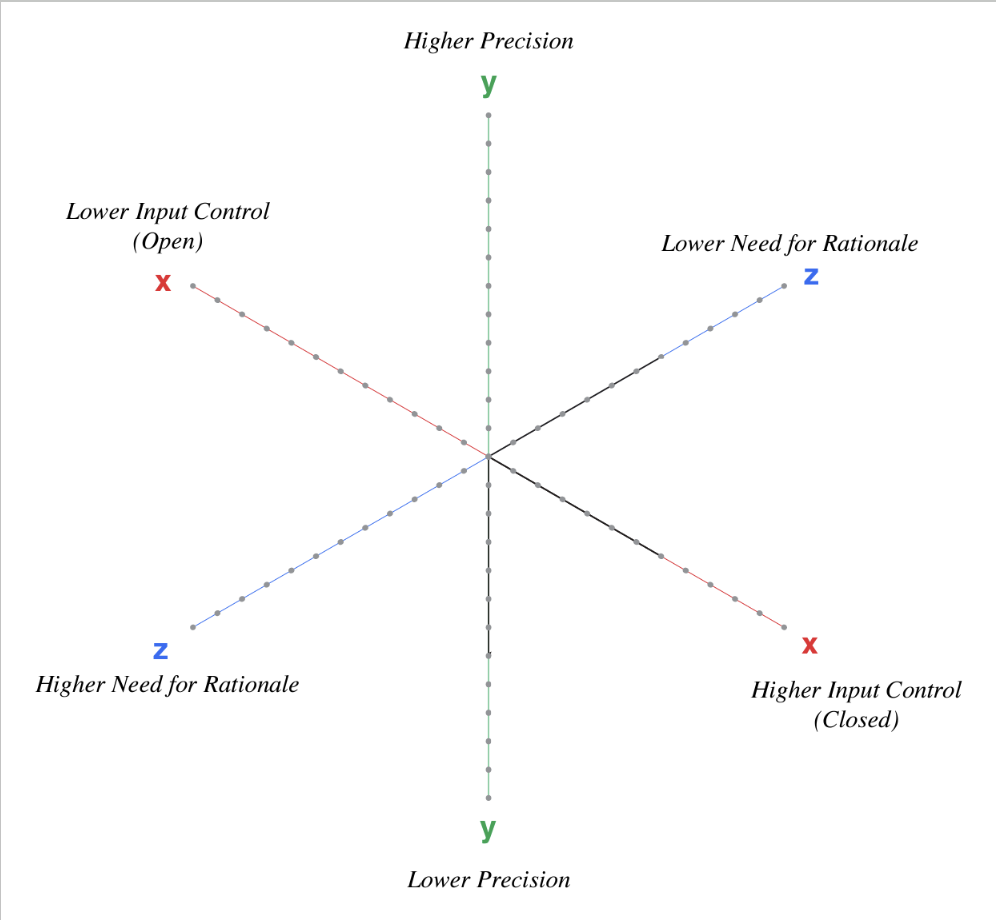
It is a trick question. It is the application of the technology to a use case - not necessarily the technology itself that we need to consider.
- AI facial recognition as the basis for an arrest
- AI facial recognition for identifying sexually exploited children
- AI Facial recognition for organizing your personal photo album
Consider the same AI technology for facial recognition applied to these three different use cases:
Each use case resides in a different octant of the risk matrix. Each has a different risk profile.

Learn more about responsible AI use with the free chapter excerpt on Training, Governance and Accountability(TGA). Follow MMA Global's Responsible AI Learning (RAIL) forum.
Wrap-up
Transformation is doing things with AI that weren't possible without it. Re-imagine the customer experience:
- What needs are gratified by a consumer engaging with your business?
- What friction in time and cost could be removed?
- What creates joy in the experience? Can you do more of that with the help of AI?
Final Check-in:
- Did you level up? After reading Part 1 of Part 1 or The AI Conundrum and participating in training, how do you score on the self assessment now? Take 12 question Self-Assessment of AI knowledge (be sure to include your name or a consistent handle so results can be compared before and after).
Overall NPS Survey: Thank you for spending the week with us!